
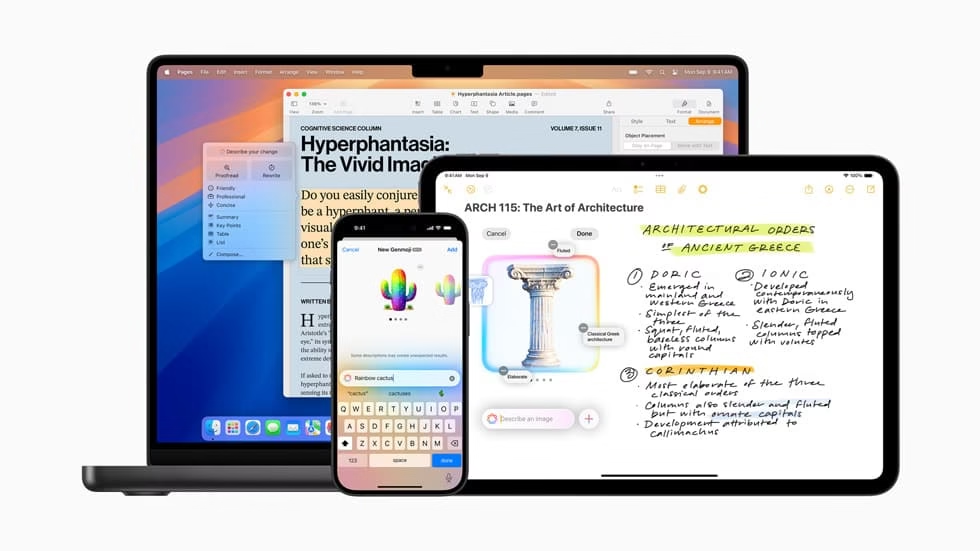
Apple Intelligence (iOS 18.2) now includes Image Playground, Genmoji, improved writing tools, smooth ChatGPT compatibility, and visual intelligence.
Also, Apple Intelligence now supports English in Australia, Canada, Ireland, New Zealand, South Africa, and the U.K., which is the first step in adding support for more languages.
With the introduction of iOS 18.2, iPadOS 18.2, and macOS Sequoia 15.2, Apple today unveiled a new suite of Apple Intelligence features that will improve customers’ experiences with the iPhone, iPad, and Mac and expand upon the initial set of functions. Apple Intelligence is a user-friendly personal intelligence system that makes significant progress in AI privacy while providing useful and pertinent intelligence.
Users can now use Image Playground to discover innovative new visual expressions, Genmoji to design the ideal emoji for every circumstance, and new work Tools upgrades to add even more vibrancy to their work.
Using visual intelligence with Camera Control, users of an iPhone 16 or iPhone 16 Pro may instantly learn more about their surroundings, building on Apple Intelligence. Additionally, users can now use ChatGPT’s knowledge without switching between applications thanks to its integration with Writing Tools and Siri, which makes tasks easier and faster than ever.
With localized English support for Australia, Canada, Ireland, New Zealand, South Africa, and the United Kingdom, Apple Intelligence also starts language expansion on December 11, 2024, providing even more consumers worldwide with powerful new ways to use their iPhone, iPad, and Mac. Throughout the year, other languages will be added, with the first batch appearing in a software update in April. These include Chinese, English (India), English (Singapore), French, German, Italian, Japanese, Korean, Portuguese, Spanish, and Vietnamese.
Create Fun, Unique Pictures with Image Playground
With ideas like themes, costumes, accessories, and locations, users can quickly and simply create entertaining and original photographs with the Image Playground experience. In addition to adding their own language descriptions, users can use their photo library to create visuals that resemble friends or relatives. Image Playground produces graphics in two different styles: Illustration, which provides images with straightforward shapes, defined lines, and colorblocking, and Animation, which produces images with a contemporary, 3D-animated appearance.
In addition to being incorporated into programs like Freeform, Keynote, and many others, the experience is integrated directly into Messages, making it simpler than ever to produce visuals for chats. Additionally, Image Playground is accessible as a recently released dedicated app.
Make Genmoji to Go with Any Situation
Genmoji, which takes emoji to the next level thanks to Apple Intelligence, opens up completely new communication channels and makes talks with friends and family more enjoyable.
A Genmoji with several alternatives will emerge when you just type a description into the emoji keyboard. Users can further develop Genmoji by making one that is modeled after a friend or relative using pictures from their photo collection. Personalized Genmoji can be made even more distinctive and personal by reflecting themes or activities and adding accessories like a hat or sunglasses. Genmoji, like emoji, can be used in texts as inline characters or shared as a sticker or response via a tapback.
Use Image Wand to Take Notes to the Next Level
New capabilities are added to the Notes app to make note-taking more dynamic and attractive. utilizing the written or visual context that is already recorded in the note, users can easily create images in their note by utilizing the Image Wand tool in the tool palette.
By just circling a crude sketch, Image Wand turns it into a refined image. In order to generate an appropriate image that enhances the note’s visual appeal and complements it, users can even circle blank spaces inside notes. Image Wand will use on-device generative models to assess the handwritten or typed content and acquire context from the surrounding environment. With Image Wand, users can produce images using the Animation, Illustration, and an extra Sketch style.
Explain How Writing Tools Have Changed
The new Describe Your Change option in Writing Tools allows users to specify the change they want to make, building on the already-existing Rewrite, Proofread, and Summarize options. When users want to make their writing seem more expressive, Describe Your Change offers them even more freedom and control. For example, they can rewrite a dinner party invitation as a poetry or add more dynamic action phrases to their résumé. This new Describe Your Change option is accessible throughout the entire Apple system and a large number of third-party programs, just like all the tools in Writing Tools.
Related Products from Amazon:
Use Visual Intelligence to Discover More About Your Environment with Just a Single Click
Thanks to the new Camera Control on the iPhone 16 range, users can instantly learn about objects and locations with a new visual intelligence experience that builds on Apple Intelligence. Text summarization and copying, language translation, identifying phone numbers or email addresses with the ability to add them to contacts, and more are all capabilities of visual intelligence. Additionally, Camera Control lets users employ ChatGPT’s problem-solving abilities to ask for an explanation of a complicated graphic, like those found in class notes, or search Google to find out where they can purchase an item. Users have discretion over what information is provided and when third-party tools are used.
Use ChatGPT's writing tools and Siri.
By integrating ChatGPT into the Siri and Writing Tools experiences in iOS, iPadOS, and macOS, Apple is enabling people to access its knowledge and its ability to comprehend images and documents without switching between apps.
With the ChatGPT connection, Siri may directly respond to user inquiries and recommend that they visit ChatGPT.
Using the system-wide Writing Tools in Compose, users can request that ChatGPT create material for any topic they are writing about. They can also include photos with their written content by using ChatGPT’s image-generation features.
Users have the option to enable ChatGPT integration and have full control over when they use it and what information is shared with ChatGPT. By default, you do not need a ChatGPT account to utilize this integration. When ChatGPT is used without an account, OpenAI does not store requests or use the data for model training. Additionally, OpenAI obscures users’ IP addresses to prevent their sessions from being connected. For those who decide to link their account, OpenAI’s data-use policies will be enforced.